
Free online volleyball scoreboard for any match
Name your teams. Keep points, sets and serves in one place, then share the match with everyone watching.
Starts at 0–0. Choose match format and scoring settings in the match controls.
No signup to start. One guest board, up to 50 board views. See free and paid limits.

Complete Match Control
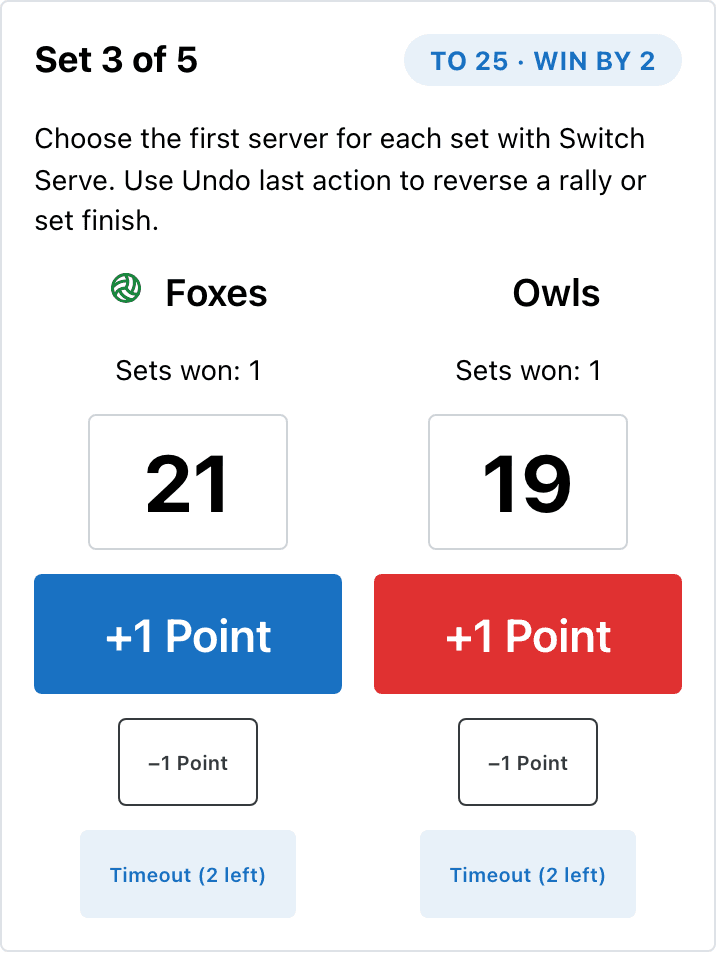
Tap +1 Point for the rally winner. The serving-team indicator follows the point. Use Undo last action to reverse a mistake—even a set-winning point.
How the Volleyball Scoreboard Works
- Create the match above. Open Game setup and sharing, then Match Settings, and choose best of three or five, point targets and timeouts before you start.
- Use Switch Serve to choose the first server for each set. Enter points as the rallies finish.
- Click Share scoreboard beside the scoring controls. Copy the spectator link or open its read-only view.
Real-time Sync
Keep the admin link for scorekeepers; send the spectator link to parents, teammates or the display screen. Saved changes appear without a manual refresh. If a save fails, the admin page tells you and restores the saved state.
Scores are entered manually. An internet connection is required for saving and live viewing.
Rally Scoring, Sets, and Win-by-2 Enforced
For a set played to 25 with win-by-two on, 24–24 → 25–24 → 26–24 means play continues after the first point and the second finishes the set. The board records that result, updates sets won and starts the next set at zero unless the match is finished.
Need to correct a result? Undo restores the previous scoring state. You can also select a set and edit its points; its result and match totals are recalculated. Selecting a set alone never awards it. End Set is a manual override for a shortened set, so use it only when that result is intentional.
Choose your competition’s format before play. For scoring explanations, see how to keep score in volleyball and volleyball scoring. The FIVB indoor rules overview explains the standard international format; local formats can differ.
Customizable Design
Use Team Customization to edit team details and Settings for supported display settings. Pro adds team logos and custom presentation. Preview the result before sharing it; check plan features for your event.
Volleyball Scoreboard Online — Free for Any Match
Start a guest match for free within the board-view limit. The scoreboard supports rally points, best-of-three or best-of-five set tracking, a shorter deciding set, serve indicators and timeouts. It runs in a web browser on a phone or laptop; viewers open their own link.
Who Uses Our Free Volleyball Scoreboard
Use it for a club match, school or JV game, beach doubles, a rec league or a friendly pickup match. Put the viewer link on a connected display, or share a QR code through the board’s sharing tools. For paper scoring, use the printable volleyball score sheet.
Pool Play Standings for Tournament Weekends
This board scores one match. For several courts, use the volleyball tournament scheduler to plan pairings and court time.
For a manually maintained points table, the online leaderboard maker is a separate option. It does not automatically import volleyball set results or calculate pool point ratios from this match.
Frequently Asked Questions
Is this volleyball scoreboard online free?
Start one guest board without signing up, with up to 50 board views. Paid plans add capacity and Pro presentation such as team logos. Check current plan limits before a larger event.
Does it support rally scoring?
Yes. You enter each rally winner with +1 Point. With win-by-two enabled, 25–24 continues and 26–24 finishes a set played to 25. The board records the set result and advances unless the match is complete.
Can I use it for beach volleyball and doubles?
Yes. Match settings include best of three or five, a regular-set target and a separate deciding-set target. Choose the format agreed for your match; indoor, beach and recreational competitions can use different formats.
Does it track which team is serving?
Yes. Awarding a rally moves the serve indicator to the team that won the point. Choose the first serving team for each set with Switch Serve. This tracks the serving team, not individual player rotations.
Can parents follow club and school matches from the stands?
Yes. Use Share scoreboard in the admin page to copy the spectator link. Viewers see saved updates without scoring controls. Both the scorer and viewers need an internet connection; delivery depends on their connection.
Does it work for JV matches without a gym scoreboard?
Yes. Open the spectator link on a connected TV or computer, or use your device’s screen-mirroring or projector setup. Choose the match settings your competition requires before play.
Can I configure the deciding set to 15 points?
Yes. Set Points to Win Deciding Set to 15 in Match Settings. The regular-set target is separate. Keep win-by-two enabled when your competition uses it.
Is this the same as a volleyball score board or volleyball score keeper?
The scoreboard is the read-only display for viewers. The scorekeeper uses the admin page to enter points, correct scores and choose the serving team. Create one match here to get both views.
Does it work as a high school volleyball scoreboard?
Yes, as a manually operated scoreboard. Set the format, targets and timeouts to your school competition’s rules. Do not assume every varsity, JV or local event uses the same format. It does not replace the official scorer’s record.
Get Started Today
Name your teams and create a volleyball scoreboard. Prefer the dashboard? Create a volleyball match there.