
Free online cricket scoreboard for any match
Keep runs, wickets and overs in view. Create a match, score each delivery and share a display for the boundary or clubhouse. Built for limited-overs games with one innings per side.
Starts at 0/0. Choose the over limit and who bats first in the match controls.
No signup to start. One guest board, up to 50 board views. See plan limits.
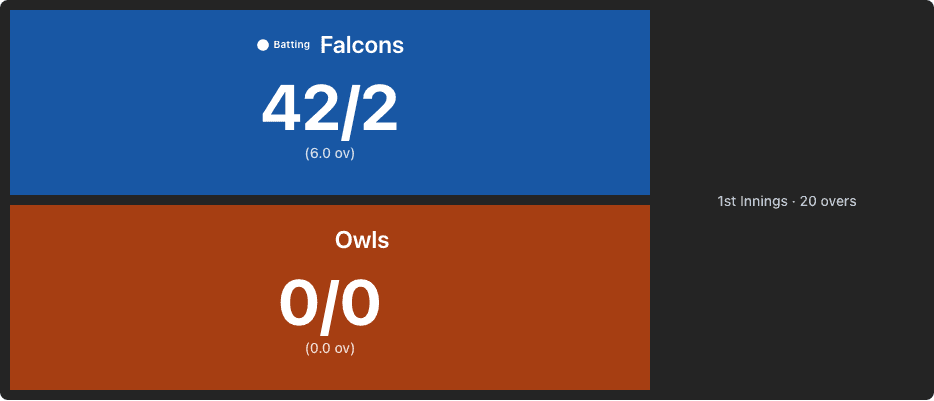
Complete Match Control
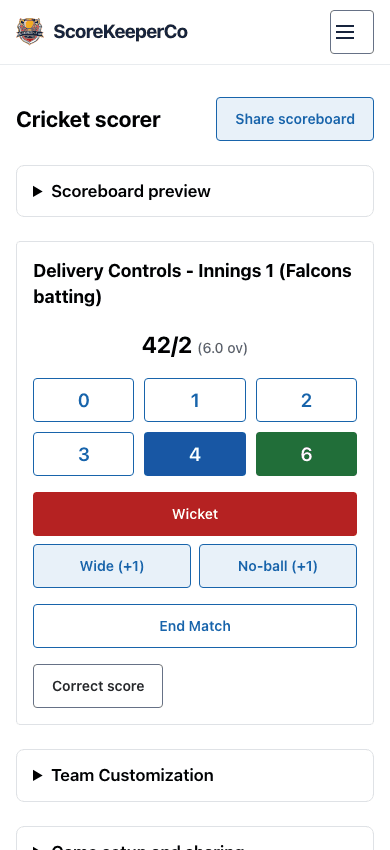
Set who bats first and the over limit in Match Settings. Tap 0, 1, 2, 3, 4 or 6 to record a legal delivery. Wicket records an out and a legal ball; Wide (+1) and No-ball (+1) add a run without using a ball.
Correct a score without losing the match
Open Correct score to edit either innings, then save once. The target and result are recalculated. A changed score from another scorer requires a fresh review, and a failed save leaves the confirmed score visible. Follow the match officials’ decision when correcting a result.
Real-time Sync
Use Share scoreboard to copy the spectator link. Viewers see saved changes; keep the admin link for trusted scorers. If a connection fails, check the saved score before entering another delivery.
Customizable Design
Keep teams recognizable with their names and supported display settings. Pro adds team logos and custom presentation. Preview on the screen you will use before the match.
Online Cricket Scoreboard — Free for Any Match
Start a free match within the guest and board-view limits. Keep team totals for club, school or backyard limited-overs cricket. This tool records one innings for each team with a ten-wicket limit; it does not replace a detailed scorebook.
Display on a TV or Projector at Club or Backyard Games
Open the spectator link on a connected screen, or use a projector or screen-mirroring setup. Check the score size from the viewing distance and keep the scorer connected throughout play.
Share a Live Score Link With Spectators
Send family and club members the spectator link from Share scoreboard. For an introduction to runs, wickets and overs, read Cricket Scoring Explained.
Built for T20 and Limited-Overs Club Matches
Choose 20 overs, 50 overs or another agreed whole-number limit before scoring. Move to the second innings when the first is complete. The display shows the target and calculates a chase, runs victory or tie. DLS adjustments, individual statistics and multi-innings formats are outside this scorer.
Frequently Asked Questions
How do I show runs, wickets, and overs on the scoreboard?
Choose the batting order and over limit in Match Settings before play. Tap a run value for a legal delivery, Wicket for a wicket, or Wide (+1) / No-ball (+1) for a one-run extra without advancing the ball. Six legal deliveries make an over. Use Correct score for additional extras or other adjustments; this is a team-total display, not a player scorebook.
Can spectators follow the score live?
Yes. Use Share scoreboard beside the scoring controls to copy the spectator link. It shows saved runs, wickets, overs and the target without scoring controls. Both devices need an internet connection; updates depend on that connection and free board-view limits apply.
Does it work on a phone or TV?
Score on a phone or tablet. Open the spectator link on a connected TV or computer, or use your device’s screen-mirroring or projector setup. Check readability and connectivity before the match.
Is it free?
Start one guest board without signing up, with up to 50 board views. Paid plans add capacity and Pro presentation such as team logos. Review the current pricing before a larger event.
Can I use it for T20 or backyard cricket?
Set 20 overs for T20, 50 for a one-day match, or another whole-number limit before play. The scorer supports one innings per team and a ten-wicket limit. It does not calculate DLS targets, individual player statistics or multi-innings match results.
Can I customize team names and colors?
Enter team names here and use Team Customization in the scorer for the supported presentation controls. Pro adds team logos and custom presentation. Preview your display before sharing.
How is this different from a physical scoreboard?
A physical scoreboard displays the score at the ground. This display opens through a spectator link on other connected screens and follows the scorer’s saved changes. Keep a separate scorebook if you need individual batting and bowling records.
Related Tools
Need another sport? Use the Online Scoreboard. For a separate break or practice timer, open the Online Timer.
Get Started Today
Name your teams and create a cricket scoreboard. Choose the batting order and over limit before the first delivery.