
The Scoreboard App with nothing to install
Keep score on your phone. Give everyone else a clear view of the game. Open the app, choose a scoreboard, and start at zero.
Open the scoreboard appOne guest board without signup, or 10 boards with a Free account. Each Free board includes 50 total shared views. See plan limits.

Controller and Display, Split Across Devices
Your scoring page stays with the scorekeeper. The Spectator link shows the saved score without editing controls, so friends can follow on another screen.
- Choose a board. Open the app, select Continue as guest or sign in, then select Create new board. Choose a sport or Generic for a game with simple point totals.
- Name your teams and score. On a generic board, open Team Customization, edit each Team Name and select Apply. Tap + to add a point or − to correct one.
- Share the display. Select Share scoreboard, copy the Spectator link and open it on another device. Keep your admin link for trusted scorekeepers.
One correction, both screens: if the Foxes have 17 but should have 16, tap − once. The saved total and the spectator display update to 16. Refresh either page to check the saved score.
Both devices need an internet connection. Before the game, test a score change and a correction on the actual display you will use.
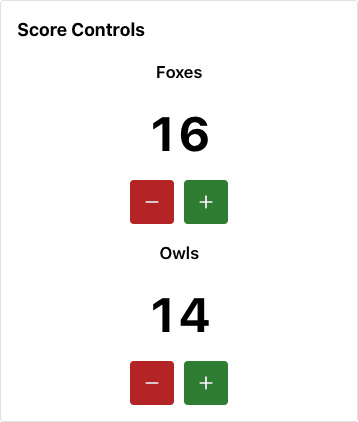
The buttons live in your own board.
A Browser-Based Scoreboard App, No Download Required
Use a modern browser on iPhone, Android, a tablet, Windows or Mac. The scoring page and shared display have separate links, so the person entering points can use a different device from the people watching.
Bookmark the dashboard to return to your boards. Create an account if you need more than one board or want to find your boards after signing in on another device.
Add the Scoreboard App to Your Home Screen
Using a browser tab is enough. For a home-screen icon, open the dashboard in Safari on iPhone, open the sharing menu, then choose Add to Home Screen. In Chrome on Android, look in the browser menu for Add to home screen and follow the prompts.
Menu names and available options vary. See Apple’s web-app instructions or Google’s shortcut instructions. If that option is missing, keep using the browser. An icon does not enable offline scoring.
Use a TV or Projector as the Display
Open the Spectator link in a compatible TV browser, or show a connected computer’s browser on the larger screen. Keep the controller on your phone and test legibility from where people will watch.
TV browsers vary. Screen mirroring or casting depends on your hardware; there is no native casting control in this app. Each Free shared board has a 50-total-view limit, including repeat visits counted by the service.
Free Scoring and Optional Pro Customization
Start with one guest board, or keep up to 10 boards with a Free account. Every Free shared board includes 50 total views. Free displays keep ScoreKeeperCo branding and may show ads.
The example above uses Pro colors and logos. Pro also removes the watermark and includes unlimited shared views. Choose a plan for the audience and styling you actually need; review the current plan details.
Frequently Asked Questions
Is there a scoreboard app that's actually free?
Yes. Start one guest board without signup, or keep up to 10 boards with a Free account. Each Free shared board includes 50 total views, not 50 simultaneous viewers. Standard scoring is free; Pro adds unlimited views, custom colors, logos and watermark removal. Free displays may include ads.
Does the scoreboard app work offline?
Use an internet connection for scoring, saving and viewing shared updates. A home-screen shortcut does not make the scoreboard work offline. Check the connection and spectator link at your venue before the game.
Is there a scoreboard app for iPhone and Android?
Open ScoreKeeperCo in a modern browser on your phone or tablet. No App Store or Play Store download is required. Your browser may offer Add to Home Screen; the option and appearance depend on the browser and device.
How do I put the scoreboard app on a TV?
Open the Spectator link in a compatible TV browser, or show a connected computer's browser on the TV or projector. Test your display before the event. Casting and screen mirroring depend on your device and browser; this app does not provide a native casting button.
Can two people control the same scoreboard app at once?
Trusted scorekeepers can use the same admin link. Coordinate who enters each score to avoid duplicate or conflicting changes. Give the Spectator link to everyone who only needs to watch. Both scoring and shared viewing need an internet connection.
Is there really no download for this scoreboard app?
Yes. Open it in your browser and choose a board. You can bookmark the dashboard or use your browser's home-screen option where available. There is no required native app installation.
What's the best scoreboard app for running a livestream?
For a browser-source workflow, ScoreKeeperCo has scorebug overlays that can be added to streaming software. Use the setup guide for your software and rehearse scoring before going live. Free branding and shared-view limits apply; paid plans add customization and unlimited views.
Is there a scoreboard app for PC?
Use a modern browser on Windows or Mac. Keep the scoring page on one device and open its read-only Spectator link on another, or display it in a separate browser window. No PC-specific installer is required.
Get the Scoreboard App
Choose your game. Name your teams. Share the score.