
Office competition leaderboard
A little friendly rivalry for the whole office. Keep score on your phone and let everyone follow on the big screen.
Create office leaderboardNo signup needed. 50 total shared views included. Pricing
Office scavenger hunt
You keep score. Everyone follows.
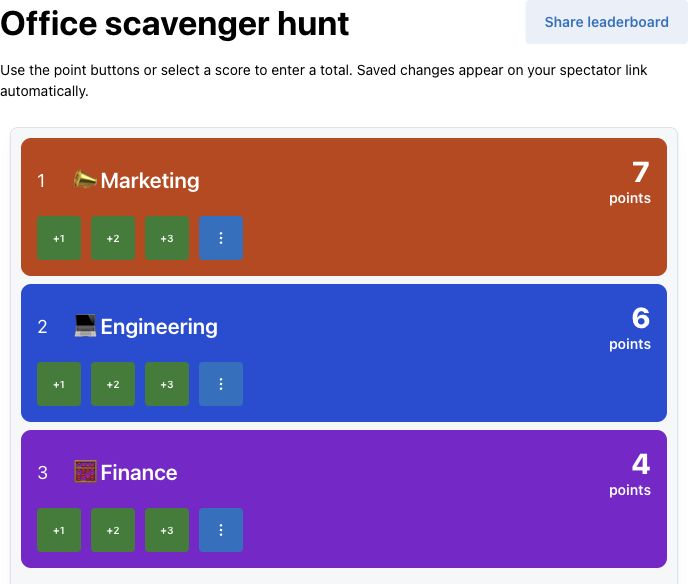
Add your teams and tap to award points, or enter a total. The spectator view follows your saved scores and keeps scoring controls with you.
Select Share leaderboard for the spectator link to send to your team or open on the office TV.
Give the office something to play for.
Trivia rounds, step challenges, hackathon judging or a sales contest: agree the rules, then enter one total per team.
Need an activity? The 20-minute scavenger hunt below gives you six prompts and a ready-to-use scoring plan.
Office leaderboard setup and contest guide
Setting One Up for Your Office
- Choose Create office leaderboard. Start one board as a guest, or sign in to keep up to 10 boards with a free account. The board starts with Team A–D at zero.
- Rename the teams and edit the title. Keep the admin link with the scorer; it grants editing access.
- Check your contest results. Select a team’s score, enter its cumulative total in Points, then select Update Score.
- Select Share leaderboard. Copy the Spectator link or choose Open spectator view for your office TV. Saved changes sync to connected viewers without a manual refresh.
The spectator link shows rankings without scoring controls. Both the scorer and viewers need an internet connection. Update totals daily, weekly or during the event; the leaderboard ranks the numbers you enter, rather than checking the activity behind them.
One Leaderboard, Any Office Competition
Use one numeric score per person or team for steps, sales, hackathon judging, trivia nights, fantasy pools or your own points game. Define the scoring rules first, then enter verified totals manually.
Common Office Competitions It Fits
For steps or workouts, rank totals logged. For sales, choose revenue or deals closed and use the sales leaderboard’s editable contest brief to define the metric, credit and cutoff. Compare these sales contest ideas with worked scoring rules for a different format. Hackathons can rank judge totals; trivia can rank cumulative round points. The board does not import CRM or activity data.
Spreadsheet vs. a Live Leaderboard
A spreadsheet can keep detailed activity records and calculations. The leaderboard provides a separate ranked display for your office TV or shared screen. Keep supporting records in your own system, then enter one total per participant; saved updates sync to connected spectators.
Branding It for Your Company
Choose a standard theme on Free. Custom company and team colors, logos, sponsor branding and watermark removal require a paid plan. Review current pricing and sharing limits before promoting the board widely.
Run a 20-minute office scavenger hunt · Six prompts and scoring rules
Run a 20-minute office scavenger hunt
Suggested format for teams of 2–4: a 3-minute briefing, 12-minute hunt and 5-minute check. Copy the six tasks for each team; keep the host checks and puzzle answer on your own sheet.
Before the clock starts
Supply paper, cups, a pen and a ruler at a checking station. Mark a safe, accessible allowed area and set the same 12-minute cutoff for every team. No running, opening drawers, touching belongings or entering desks without permission; exclude confidential screens and collecting personal information.
Offer a seated alternative: bring approved sample objects and a copy of a public sign to the station so teams can complete the same prompts for the same points without moving around the office.
Spot a circle
1 pointFind a circular object in the allowed shared area. Leave it where it is.
Host check: Tell the host the object and location; the host checks it in place.
Find a helpful sign
1 pointFind a public sign that helps visitors navigate the office.
Host check: Read its wording to the host, who checks the sign. Do not record a screen or private notice.
Find a reusable item
1 pointIdentify a reusable cup, bottle or container in the permitted area.
Host check: Point it out for the host to check. Do not handle another person's belongings.
Build a paper bridge
2 pointsTogether, fold one host-supplied sheet into a bridge between two host-supplied cups, 10 cm apart.
Host check: At the checking station, the host measures the gap and checks that a host-supplied pen rests on the bridge for five seconds.
Make a team mascot
2 pointsDraw a mascot on host-supplied paper. Each teammate adds a visible part; choose a team name.
Host check: Show the drawing and have each teammate point out their contribution. No names or personal details are required.
Solve the desk puzzle
3 pointsUse each digit 1, 2, 3 and 4 exactly once, with only addition and multiplication, to make 14. Do not join digits into larger numbers.
Host check: Show the host your written equation. Host answer: (4 × 3) + (2 × 1) = 14. Keep this answer covered on participant copies.
Check first, then enter the total
Award each prompt once, with no duplicate credit. The maximum is 10 points: three 1-point finds, two 2-point tasks and one 3-point puzzle. Check only work completed by the announced cutoff.
Worked example: fictional Marketing completes two finds, the bridge and the puzzle: 1 + 1 + 2 + 3 = 7 points. Select its score and set Points to 7. If a result is corrected, enter the corrected cumulative total rather than adding the whole total again.
Equal totals share rank. Share the win, or announce a manual tie rule before the briefing. Keep task checklists and evidence outside the app: this board does not accept hunt photo submissions, verify locations or score checkpoints automatically.
Need to divide the office first? Use the random group generator, then rename your leaderboard entries to match.
Frequently Asked Questions
Is the office competition leaderboard free?
Start one board as a guest, or keep up to 10 boards with a free account. Each free shared board includes 50 total views, not 50 simultaneous viewers. Standard themes and manual scoring are free; custom colors, logos and watermark removal require a paid plan. See Pricing for current options.
What kinds of office competitions does this work for?
Use one manually entered numeric total per person or team for steps, sales, hackathon judging, trivia or a scavenger hunt. The organizer checks the underlying activity and enters totals; the board does not connect to a CRM or verify hunt tasks.
Can I display it on the office TV?
Yes. Select Share leaderboard, then Open spectator view, or copy the Spectator link to your TV or shared screen. Spectators do not need an account. Saved score changes sync to connected viewers; both the scorer and viewers need an internet connection. Free viewing limits apply.
Can multiple people update scores?
Keep the admin link with your trusted scorekeepers: it grants editing access, while the spectator link only shows results. The owner can set an admin password for additional protection. Share the spectator link with participants rather than the admin link.
Can I run an office scavenger hunt with this?
Yes, for the standings. Use the 20-minute plan on this page, check each completed prompt outside the app, then manually enter each team's cumulative points. Checklists and evidence stay outside ScoreKeeperCo; the leaderboard does not provide photo submissions, location checks or automatic checkpoint scoring. Equal totals share rank; agree any manual tie rule before starting.
Set Up Your Office Leaderboard
Add teams, enter checked totals and share the spectator link.
Create office leaderboardMore starting formats: Templates · Leaderboard Maker