Your questions. Their questionable team names.
A free trivia night scoreboard for bars, restaurants, and hosts — track team scores round by round and show live rankings on a screen or TV instead of a whiteboard.
Create a trivia scoreboardStarts with four teams. No account needed to try it. Free shared boards include 50 total views. See pricing.
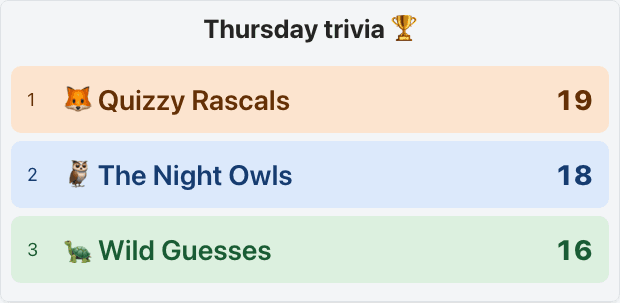
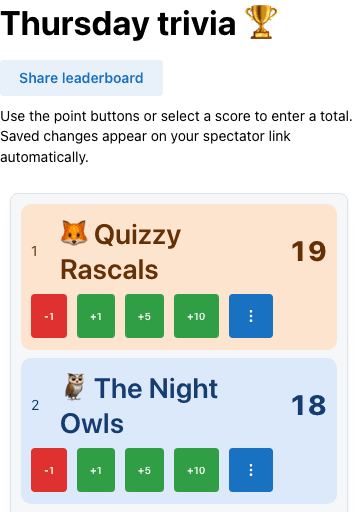
Set up one entry per team before the night starts, using team names players picked at check-in. After each round, add that round’s points to each team’s total. The spectator view reorders as each change is saved.
Keep the admin link for the host. Guests use the spectator link and see scores without editing them. The host’s team rows stay in place while scoring; the spectator view sorts by total.
Updates appear as you save them. If you want a dramatic end-of-round reveal, switch the venue screen away from the spectator page while entering scores.
A worked scoring example
For this example, each round has eight questions worth one point each. Wrong or blank answers score zero. Announce those rules before you begin.
Quizzy Rascals score 6, then 7, then 6: 19 points. After round two, their total is 13. Add six points after round three, or select their score and enter 19. Don’t replace their total with the round score of 6.
| Team | R1 | R2 | R3 | Total |
|---|---|---|---|---|
| Quizzy Rascals | 6 | 7 | 6 | 19 |
| The Night Owls | 7 | 5 | 6 | 18 |
| Wild Guesses | 5 | 6 | 5 | 16 |
The live board keeps current totals, not separate round columns. Keep the original answers and a round log so you can check a disputed score. Prefer to save each round online? Set up a multi-activity scoreboard to enter separate round scores and show their summed totals.
Download the printable round log (PDF)One page. Eight teams, six rounds, corrections and a tiebreak note. A host worksheet, not a question pack.
Corrections: if the Night Owls’ 18 includes one point awarded by mistake, select their score and change the total to 17, or use −1 once. Note the affected round and reason on your log before continuing.
Ties: equal totals share a rank. Agree on a tiebreak in advance, such as a closest-number question. If you award one bonus point to its winner, record that adjustment and add the point yourself; the app does not judge the answer.
Time limits: use the online timer for each answer window and the host’s buzzer sound to signal time’s up. Both are separate tools; the buzzer does not identify which team pressed first. For a lesson review game, try the classroom leaderboard.
A trivia night scoreboard tracks each team’s points as the night goes on and shows a live ranking so everyone knows where they stand after every round. Bring your own questions, mark the answers, and enter the scores. Players watch the standings on a shared screen or their own device.
A whiteboard works, but it means erasing mistakes and rewriting the list to sort teams by rank. A live scoreboard re-sorts the spectator view as you enter scores. Keep a separate round log for the detail; the screen gives everyone the current standings.
Show the standings between rounds at a pub quiz, restaurant trivia night, office party, fundraiser or game with friends. Open the spectator page on a browser-equipped screen, or connect your laptop to a TV or projector. Check the connection and text size from the back of the room before guests arrive.
Choose a preset theme for free. Pro plans let you add custom team colors and logos and remove the ScoreKeeperCo watermark — useful when a local business is sponsoring the night’s prizes. Compare plans and one-time event passes before sharing with a larger audience.
Yes. You can try the trivia template without an account. Free shared leaderboards include 50 total views, not 50 simultaneous viewers. Pro includes unlimited views, custom team colors, logos and watermark removal ($19/month or $79/year). One-time passes are also available on the pricing page.
Yes. Add the round's points to each team's running total, or select a score to enter the new total directly. The spectator rankings update as you save each change. The board keeps current totals; it does not keep a separate score column or history for each round. Use the downloadable round log if you need that record.
Yes. Select Share leaderboard on your scoring page, then Open spectator view. Show that spectator page on a connected TV or projector, or open its link in another device's browser. Share the spectator link with guests and keep the admin link private. Viewers do not need an account.
Yes, on Pro plans. Add a sponsor's logo to the board and remove the ScoreKeeperCo watermark for a branded screen. Custom team colors are also a paid feature; preset themes are available for free.
Equal totals share a rank: two teams tied for first show =1, and the next team is third. The board does not choose a winner for you. Announce a tiebreak rule before play; if you award a bonus point to settle it, add that point to the winning team's total and record why on your round log.
No. Bring your own questions, collect the answers and award points yourself. ScoreKeeperCo keeps the team totals and displays the live rankings. A separate online timer can time the answer window; it does not award points or automatically end scoring.
You bring the questions. Give every team a place on the board.
